Four Ways to Do JSON in ABAP

There are four JSON APIs an ABAP developer is likely to bump into without looking for them: XCO_CP_JSON, /UI2/CL_JSON, CALL TRANSFORMATION id with the sXML JSON writer, and CL_ABAP_JSON. Most code in the wild picks whichever one the original author saw first. That tends to be /UI2/CL_JSON, because it has been around since 2013 and answers most questions correctly.
The reasonable question is which one to reach for now. The short answer is that two of the four are released for S/4HANA Cloud private edition1 and the ABAP Cloud environment;2 the third is the lowest-level escape hatch, and the fourth is not released at all.
What is released
The SAP Cloudification repository lists XCO_CP_JSON and /UI2/CL_JSON as released for S/4HANA Cloud private edition1 and the ABAP Cloud environment.2 CL_SXML_STRING_WRITER and CL_SXML_STRING_READER are released too, which keeps the CALL TRANSFORMATION id route legal. CL_ABAP_JSON is absent from both lists.
For ABAP Cloud code that has to compile against the released-API check, this already reduces the options to three: XCO_CP_JSON, /UI2/CL_JSON, or CALL TRANSFORMATION id. Inside on-premise classic ABAP, CL_ABAP_JSON is still callable, but anything that might one day move into a cloud language version is on borrowed time.
XCO_CP_JSON
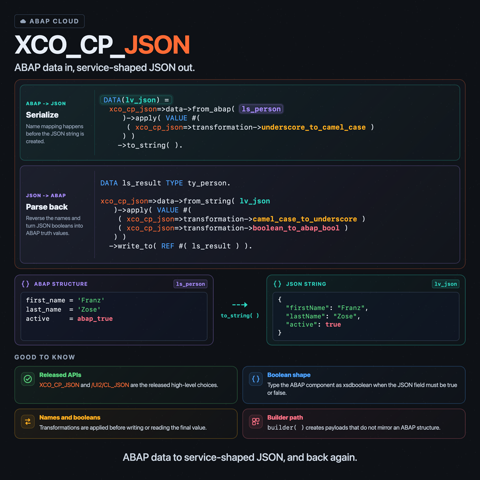
XCO_CP_JSON is the JSON module of the Extension Components (XCO) library, the cloud-friendly utility library SAP has been building out for the last few releases. The API is fluent and structured around three roles: data for reading and writing, transformation for name and type mapping, and the data builder for constructing JSON without an ABAP source.3
TYPES:
  BEGIN OF ty_specialist_out,
    first_name TYPE string,
    last_name  TYPE string,
    active     TYPE xsdboolean,
  END OF ty_specialist_out,
  BEGIN OF ty_specialist_in,
    first_name TYPE string,
    last_name  TYPE string,
    active     TYPE abap_bool,
  END OF ty_specialist_in.

DATA(ls_out) = VALUE ty_specialist_out(
  first_name = 'Franz' last_name = 'Zose' active = abap_true ).

" ABAP -> JSON, with snake_case mapped to camelCase
DATA(lv_json) = xco_cp_json=>data->from_abap( ls_out
  )->apply( VALUE #(
    ( xco_cp_json=>transformation->underscore_to_camel_case ) )
  )->to_string( ).

" JSON -> ABAP, reversing the name mapping and accepting JSON booleans
DATA ls_in TYPE ty_specialist_in.
xco_cp_json=>data->from_string( lv_json
  )->apply( VALUE #(
    ( xco_cp_json=>transformation->camel_case_to_underscore )
    ( xco_cp_json=>transformation->boolean_to_abap_bool ) )
  )->write_to( REF #( ls_in ) ).
The choice of xsdboolean on the outbound type is deliberate. XCO_CP_JSON=>data->from_abap follows the asJSON convention, so an abap_bool field (character X or space) serializes as a string. xsdboolean is the asJSON-canonical boolean type and renders as a JSON true or false. For inbound, boolean_to_abap_bool turns the JSON boolean back into the conventional abap_bool X or space without manual fix-up, which keeps downstream code idiomatic.
The transformation list is what makes XCO comfortable for talking to real external services. underscore_to_camel_case, underscore_to_pascal_case, and their reverses cover the two name styles most non-ABAP services use. The interface IF_XCO_CP_JSON_TRNSFRMTN_FCTRY lists the full set in one place.
The builder is the third role. It is the right tool when the payload is not a one-to-one mirror of an ABAP structure:
DATA(lv_built) = xco_cp_json=>data->builder( )->begin_object(
  )->add_member( 'firstName' )->add_string( 'Franz'
  )->add_member( 'age' )->add_number( 47
  )->add_member( 'active' )->add_boolean( abap_true
  )->end_object( )->get_data( )->to_string( ).
The documented XCO API is narrower than /UI2/CL_JSON in a few practical places: no lowercase pretty_mode, no format_output parameter,4 and no counterpart to /UI2/CL_JSON=>generate for creating an ABAP data reference from an unknown JSON shape.5 Those are jobs where the older class still has explicit switches or helper methods.
/UI2/CL_JSON
/UI2/CL_JSON is the classic ABAP JSON converter. It is still the most feature-complete option of the four, is listed as released for S/4HANA Cloud private edition1 and the ABAP Cloud environment,2 and the open-source SAP/abap-to-json repository keeps an up-to-date community variant for code that wants to ship updates ahead of SAP's delivery cycle.6
The everyday API is serialize / deserialize:
DATA(lv_json) = /ui2/cl_json=>serialize(
  data          = ls_out
  pretty_name   = /ui2/cl_json=>pretty_mode-camel_case
  format_output = abap_true ).

DATA ls_parsed TYPE ty_specialist_in.
/ui2/cl_json=>deserialize(
  EXPORTING json        = lv_json
            pretty_name = /ui2/cl_json=>pretty_mode-camel_case
  CHANGING  data        = ls_parsed ).
pretty_mode carries the name-formatting choice. format_output = abap_true turns on indentation, which is convenient for log output and for hand-debugging an HTTP response.4 The class also handles ABAP_BOOL in both directions, including the three-state boolean some legacy types use. Its generate method, and deserialization into REF TO data, let generic code work with a shape it does not know at compile time.5
What /UI2/CL_JSON lacks is a builder API. JSON that is not a direct mirror of an ABAP structure tends to grow either an intermediate structure with the exact target shape, or a string concatenation routine. Both are workable, neither is graceful.
If /UI2/CL_JSON covers the case at hand, there is no concrete reason to migrate to XCO_CP_JSON for migration's sake. The class is released, well-tested, and known to virtually every ABAP developer who has touched JSON in the last decade.
CALL TRANSFORMATION id
CALL TRANSFORMATION id is the documented low-level route. With the identity transformation and the sXML JSON writer, ABAP data is serialized to the canonical asJSON format and parsed back with the same statement. No helper class, no fluent API, no name mapping.7
DATA lo_writer TYPE REF TO cl_sxml_string_writer.
lo_writer = cl_sxml_string_writer=>create( type = if_sxml=>co_xt_json ).

CALL TRANSFORMATION id
  SOURCE specialist = ls_out
  RESULT XML lo_writer.

DATA(lv_json_bytes) =
  lo_writer->get_output( ).

DATA ls_parsed TYPE ty_specialist_out.

CALL TRANSFORMATION id
  SOURCE XML lv_json_bytes
  RESULT specialist = ls_parsed.
The shape of the output is the asJSON shape, not free-form JSON. ABAP type information leaks through, names stay uppercase, and elementary types are rendered close to their ABAP form. That is fine for ABAP-to-ABAP exchange across systems, since both sides round-trip cleanly through the identity transformation. For talking to a JavaScript or Java service, the asJSON shape is awkward enough that most code reaches for one of the higher-level options or writes a small ST transformation on top.
Performance is the practical argument for staying at this level. SAP Help documents that the identity transformation runs in an optimized ID engine,8 and the SAP/abap-to-json README points to simple transformations when maximum performance matters more than /UI2/CL_JSON's ABAP type handling and name formatting.6
SAP has also announced camelCase support for CALL TRANSFORMATION, planned for SAP BTP ABAP environment 2605, SAP S/4HANA Cloud Public Edition 2608, SAP S/4HANA 2027, and SAP S/4HANA Cloud Private Edition 2027. The announced option only works with the default ID transformation, so it may make this route less awkward for simple payloads, but it does not change the broader tradeoff: CALL TRANSFORMATION id remains the low-level path rather than a full convenience API.9
The other use case is integration code that already owns an ST or XSLT transformation for the XML side of the same interface. With if_sxml=>co_xt_json the same transformation can target JSON instead of XML without a second mapping layer.
CL_ABAP_JSON
CL_ABAP_JSON exposes a parser and a small set of helpers built on top of the sXML JSON readers. It has the only path-based access in the four APIs. get_value( 'address.city' ) walks a JavaScript-style dot path; is_true, is_false, and is_null ask the same path-style questions; set_string_value, set_numeric_value, set_true, set_false, and set_null mutate selected nodes; render and render_to_utf8 write the result back out.
DATA(lv_json) =
  `{"firstName":"Franz","address":{"city":"Mannheim"},"active":true}`.

DATA(lo_doc) = NEW cl_abap_json( lv_json ).
DATA(lv_city)   = lo_doc->get_value( 'address.city' ).
DATA(lv_active) = lo_doc->is_true( 'active' ).

lo_doc->set_string_value(
  iv_path  = 'address.city'
  iv_value = 'Heidelberg' ).

DATA(lv_updated) = lo_doc->render( ).
For touching one or two fields without ever modelling the whole payload, this is the most direct API of the four. It also has parse_from_utf8 / render_to_utf8 for the cases where the surrounding code is dealing in xstring over HTTP rather than string.
The catch: CL_ABAP_JSON is not in either released-API list. It works in classic on-premise ABAP, but the released-API check in ABAP Cloud and in cleaned-up S/4HANA private-cloud projects flags it. That makes it a useful local helper for older code and a poor choice for anything that should remain portable into ABAP Cloud.
How to pick
A practical reading of the four:
XCO_CP_JSONfor new ABAP Cloud code that talks to camelCase or PascalCase JSON services. Use the builder for non-mirror payloads./UI2/CL_JSONfor everything where its feature set is enough, especially when pretty-printing, lowercase formatting, or dynamic data generation is on the list. Released, broadly available, no surprises.CALL TRANSFORMATION idwith the sXML JSON writer when the payload is asJSON for ABAP-to-ABAP exchange, when a transformation already exists for the XML form of the same data, or when a profile says one of the helper classes is the bottleneck.CL_ABAP_JSONonly inside classic on-premise code, for path-based access or mutation, and with the understanding that ABAP Cloud will not accept it.
The differences between the first two are smaller than the conversation tends to suggest. The differences between either of them and the third are larger than the API styles imply. The fourth is a useful but quietly orphaned utility. Picking on purpose mostly means knowing that the second has more features than its age suggests and that the fourth is not the cloud-default it sometimes gets painted as.
Sources
Footnotes
-
SAP, Cloudification repository, released APIs for SAP S/4HANA Cloud Private Edition ↩ ↩2 ↩3
-
SAP, Cloudification repository, released APIs for SAP BTP ABAP Environment ↩ ↩2 ↩3
-
SAP, SAP/abap-to-json FAQ ↩ ↩2
-
SAP Help, ABAP and JSON, Transformations ↩
-
SAP Help, CALL TRANSFORMATION ↩
-
SAP Help, Implementation roadmap ↩