CL_BALI_LOG: Application Logs Without the BAL Function Modules

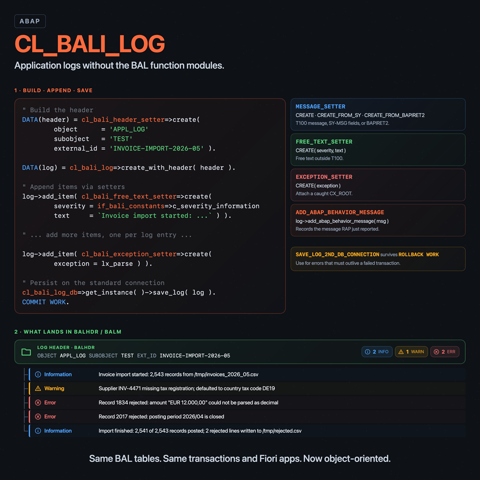
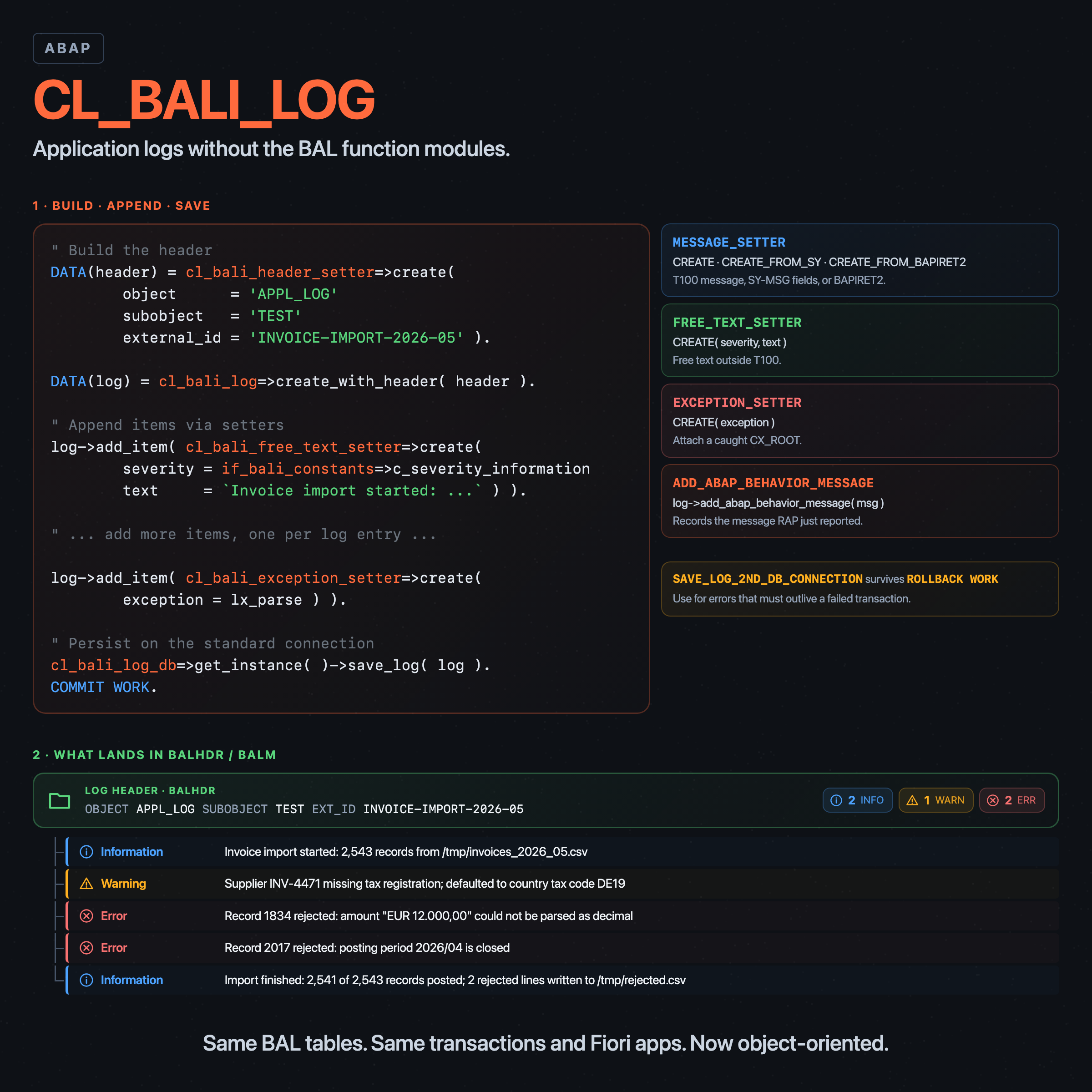
Application logging in ABAP has historically meant a small herd of function modules: BAL_LOG_CREATE, BAL_LOG_MSG_ADD, BAL_DB_SAVE, and a few of their cousins. The pattern works, but it leaks procedural details into every caller, hides the data structures behind BAL_S_LOG and friends, and tends to age into a small layer of utility wrappers per project.
SAP shipped an object-oriented alternative in the form of the BALI classes. CL_BALI_LOG is the log itself, CL_BALI_LOG_DB is the persistence gateway, and a handful of setter classes (CL_BALI_MESSAGE_SETTER, CL_BALI_FREE_TEXT_SETTER, CL_BALI_EXCEPTION_SETTER) produce the items that go into the log. The whole package sits in SZAL_API and is released for ABAP Cloud development.1
The examples below use the shipped log object APPL_LOG / subobject TEST. Any other object/subobject pair works the same way, whether SAP shipped it or you define your own through SLG0 (on classic AS ABAP) or CL_BALI_OBJECT_HANDLER (in environments where SLG0 is not available). BALI does not re-implement the log layer; under the hood the classes still call the same BAL_* function modules the procedural API has always used. The OO surface is the part that is new.
Creating and adding items
The header carries the application log object and subobject, plus an optional external identifier that becomes useful when you later want to find the log without remembering its generated handle:
DATA(header) = cl_bali_header_setter=>create(
                 object      = 'APPL_LOG'
                 subobject   = 'TEST'
                 external_id = 'HAMMER-DEMO-1' ).

DATA(log) = cl_bali_log=>create_with_header( header = header ).
cl_bali_log=>create( ) also exists for the rare case where you want a log without a descriptor, but the create-with-header form is the one to reach for in real code. cl_bali_header_setter=>create is where descriptor validation happens: it calls BAL_OBJECT_SUBOBJECT_CHECK against BALOBJ / BALSUB, so a typo in the object or subobject name fails fast with CX_BALI_INVALID_PARAMETER before any log object is built. Add an item via the matching setter:
log->add_item( cl_bali_message_setter=>create(
                 severity = if_bali_constants=>c_severity_information
                 id       = '00'
                 number   = '001'
                 variable_1 = 'Hello'
                 variable_2 = 'BALI' ) ).

log->add_item( cl_bali_free_text_setter=>create(
                 severity = if_bali_constants=>c_severity_status
                 text     = 'A free-text item.' ) ).
CL_BALI_MESSAGE_SETTER has three factory methods: CREATE for explicit message attributes, CREATE_FROM_SY for the classic SY-MSGID / SY-MSGNO fields, and CREATE_FROM_BAPIRET2 for the BAPI return structure. CL_BALI_FREE_TEXT_SETTER=>CREATE takes a severity and a string and is the right tool when the message you want to record was never defined in T100. There is also CL_BALI_EXCEPTION_SETTER for attaching an exception object to a log item.
Severities are constants on IF_BALI_CONSTANTS:
| Constant | Value | Meaning |
|---|---|---|
C_SEVERITY_STATUS | S | Status (also the default) |
C_SEVERITY_INFORMATION | I | Information |
C_SEVERITY_WARNING | W | Warning |
C_SEVERITY_ERROR | E | Error |
C_SEVERITY_TERMINATION | A | Termination / abort |
C_SEVERITY_EXIT | X | Exit (most severe) |
C_SEVERITY_DEFAULT aliases C_SEVERITY_STATUS. The setter falls back to the default for anything outside that set, so passing a stray character does not blow up the call, it just downgrades the severity.
Persistence and the COMMIT
Saving is a two-step affair: hand the log to CL_BALI_LOG_DB, then commit.2
DATA(db) = cl_bali_log_db=>get_instance( ).
db->save_log( log = log ).
COMMIT WORK AND WAIT.
SAVE_LOG stages the rows on the standard database connection, but it does not commit on its own. Without a following COMMIT WORK, nothing reaches the database. With it, the log is persisted under the handle returned by log->get_handle( ), which is a 22-character BALLOGHNDL value.
The transactional contract is declared on the interface itself: IF_BALI_LOG_DB types SAVE_LOG as if_abap_tx_save=>ty_weak, marking it as a participant in a surrounding unit of work that must be closed with COMMIT WORK for the changes to take effect.3
The "commit immediately" reflex matters here, and is worth stating directly. Logs exist to explain what went wrong. The moment you most want to read one is also the moment the calling program is closest to crashing. If a short dump or a MESSAGE A... triggers between SAVE_LOG and the next COMMIT WORK, the rows the runtime would have written are lost, and the log entry that should have explained the failure is gone with it. Commit the log as early as the application's transactional contract allows; do not bundle log persistence with the same COMMIT WORK that decides the business outcome unless that is really what you want.
SAVE_LOG vs SAVE_LOG_2ND_DB_CONNECTION
There is a second save method that looks similar but behaves quite differently:
db->save_log_2nd_db_connection( log = log ).
SAVE_LOG_2ND_DB_CONNECTION opens a separate database connection, writes the log there, and commits on that connection internally. The application's own transaction can still roll back, can be aborted by a runtime error, can short-dump, and the log stays. The method is classified as if_abap_tx_functional=>ty rather than as a save: it is not part of the surrounding unit of work. Internally both save methods route through BAL_DB_SAVE; the difference is that the second-connection branch passes i_2th_connect_commit = abap_true, so the function commits on that connection before returning.
This is the same shutdown / abort scenario as above, made explicit. SAVE_LOG plus a deferred COMMIT WORK loses the log on a dump; SAVE_LOG_2ND_DB_CONNECTION does not, because the commit has already happened on a connection the application cannot roll back.
The two behaviors are easy to confuse, so it is worth showing the difference rather than describing it. Two scenarios against the demo object, one for each save method, both followed by ROLLBACK WORK:
METHOD save_log_rolls_back.
  DATA(log) = make_log( |HAMR-{ sy-uzeit }-R| ).
  log->add_item( cl_bali_free_text_setter=>create(
    severity = if_bali_constants=>c_severity_status
    text     = 'Will be rolled back.' ) ).

  DATA(db) = cl_bali_log_db=>get_instance( ).
  db->save_log( log = log ).
  ROLLBACK WORK.

  DATA reloaded TYPE REF TO if_bali_log.
  TRY.
      reloaded = db->load_log_with_items( handle = log->get_handle( ) ).
      cl_abap_unit_assert=>fail( 'rolled-back log should not be readable' ).
    CATCH cx_bali_runtime.
      " expected: rollback dropped the persisted rows
  ENDTRY.
ENDMETHOD.

METHOD log2nd_db_survives_rollback.
  DATA(log) = make_log( |HAMR-{ sy-uzeit }-2| ).
  log->add_item( cl_bali_free_text_setter=>create(
    severity = if_bali_constants=>c_severity_status
    text     = 'Survives the rollback.' ) ).

  DATA(db) = cl_bali_log_db=>get_instance( ).
  db->save_log_2nd_db_connection( log = log ).
  ROLLBACK WORK.

  DATA(reloaded) = db->load_log_with_items( handle = log->get_handle( ) ).
  cl_abap_unit_assert=>assert_equals(
    act = lines( reloaded->get_all_items( ) )
    exp = 1 ).
ENDMETHOD.
The negative case proves itself: a SAVE_LOG followed by ROLLBACK WORK leaves no log to load. The reload raises CX_BALI_RUNTIME because the handle no longer corresponds to any row. The positive case is symmetric: a SAVE_LOG_2ND_DB_CONNECTION followed by the same ROLLBACK WORK still has its item.
The choice is not academic. If you are logging an error that should be visible to operations regardless of whether the surrounding transaction commits, SAVE_LOG_2ND_DB_CONNECTION is the right call. If the log is a record of work that only matters when the work itself succeeded, plain SAVE_LOG plus the application's own COMMIT WORK is what you want. Getting these mixed up produces a class of bug that is hard to spot: the code paths that recorded the most interesting failures are exactly the ones whose logs vanish.
The deprecated alternative form db->save_log( log = log use_2nd_db_connection = abap_true ) still exists for source compatibility. The interface marks it as deprecated and points at SAVE_LOG_2ND_DB_CONNECTION. Use the dedicated method.
Reading logs back
LOAD_LOG_WITH_ITEMS does what the name says.4
DATA(reloaded) = cl_bali_log_db=>get_instance(
                   )->load_log_with_items( handle = log->get_handle( ) ).

DATA(items) = reloaded->get_all_items( ).
For a header-only read there is LOAD_LOG( ..., read_only_header = abap_true ). The shape of the returned IF_BALI_LOG is the same in either case; the difference is that LOAD_LOG skips the item read up front. A later call to GET_ALL_ITEMS will then fetch them on demand, because CL_BALI_LOG deliberately checks BAL_LOG_MSG_EXIST before BAL_LOG_READ and triggers a lazy load when items have not been read yet. The header counters are populated on either path, which is what makes the header-only call useful: code that only needs to decide whether anything happened can read the header and skip the item fetch entirely.
The counters are direct read-only attributes on IF_BALI_HEADER_GETTER:
DATA(header) = reloaded->get_header( ).
cl_abap_unit_assert=>assert_equals( exp = 3 act = header->number_all_items ).
cl_abap_unit_assert=>assert_equals( exp = 1 act = header->number_error_items ).
cl_abap_unit_assert=>assert_equals( exp = 2 act = header->number_warning_items ).
There is no GET_STATISTICS method to call. NUMBER_ALL_ITEMS, NUMBER_ABORT_ITEMS, NUMBER_ERROR_ITEMS, NUMBER_WARNING_ITEMS, NUMBER_INFORMATION_ITEMS, and NUMBER_STATUS_ITEMS are filled when the log is loaded from the database.
For searching across logs, LOAD_LOGS_VIA_FILTER and LOAD_LOGS_W_ITEMS_VIA_FILTER take a CL_BALI_LOG_FILTER and return a table of log references. The filter accepts the usual descriptors (object, subobject, external ID, user, date range) and is the way to find logs without a handle.
A complete walkthrough
Putting the moving parts together, the smallest useful flow looks like this:
DATA(header) = cl_bali_header_setter=>create(
                 object      = 'APPL_LOG'
                 subobject   = 'TEST'
                 external_id = 'HAMMER-DEMO-1' ).

DATA(log) = cl_bali_log=>create_with_header( header = header ).

log->add_item( cl_bali_message_setter=>create(
                 severity = if_bali_constants=>c_severity_information
                 id = '00' number = '001'
                 variable_1 = 'unit'
                 variable_2 = 'test' ) ).

log->add_item( cl_bali_free_text_setter=>create(
                 severity = if_bali_constants=>c_severity_status
                 text     = 'A free-text item.' ) ).

cl_bali_log_db=>get_instance( )->save_log( log = log ).
COMMIT WORK AND WAIT.

DATA(reloaded) = cl_bali_log_db=>get_instance(
                   )->load_log_with_items( handle = log->get_handle( ) ).
No function module call sites, no BAL_S_LOG work area. After this flow, lines( reloaded->get_all_items( ) ) = 2.
RAP behavior messages
CL_BALI_LOG knows about RAP. ADD_ABAP_BEHAVIOR_MESSAGE takes a REF TO IF_ABAP_BEHV_MESSAGE, the same interface produced by NEW MESSAGE in a behavior implementation. The mapping is straightforward: the message ends up in the log as a message-category item (the 'M' value behind IF_BALI_CONSTANTS=>C_CATEGORY_MESSAGE) with the severity, message ID, and number from the behavior message. The deliberate consequence is that a RAP behavior implementation can record the error it just reported to the framework, in the same call, without translating the message into a plain BAPIRET2 first.
A few things worth knowing
CL_BALI_OBJECT_HANDLER exists for creating and changing log objects and subobjects programmatically, but it checks S_DEVELOP authorization and only accepts objects defined as APLO TADIR entries with the right ABAP language version. For ad hoc test code, reuse a shipped object like APPL_LOG / TEST instead of defining a new one. For production code, define the object/subobject the same way you would have for classic BAL: through transaction SLG0 on classic AS ABAP, or through CL_BALI_OBJECT_HANDLER on ABAP Cloud where SLG0 is not exposed.
The exception hierarchy under CX_BALI_RUNTIME is informative. CX_BALI_INVALID_PARAMETER covers descriptor problems (missing object/subobject, whitelist failures, mismatched ABAP language version), and the chained text usually identifies the offending check. If a logging utility catches the runtime root, log the chained text rather than swallowing it.
ASSIGN_TO_CURRENT_APPL_JOB is a parameter on both save methods. Setting it links the saved log to the currently running application job, which is the path to making the log visible inside the job's transaction log in the Application Jobs Fiori app. Useful when the log is produced from inside a scheduled job and you want the operator to find it without grepping handles.
The XCO Business Application Log module5 is a separate, higher-level abstraction over the same BAL infrastructure and lives in the XCO library. It and the BALI classes are not in competition: XCO gives you a fluent builder over a few common patterns, BALI gives you the full object model. Reach for XCO when its surface is enough and you are already using XCO; reach for BALI when you need the full API.
Reading logs back, in human-facing tools
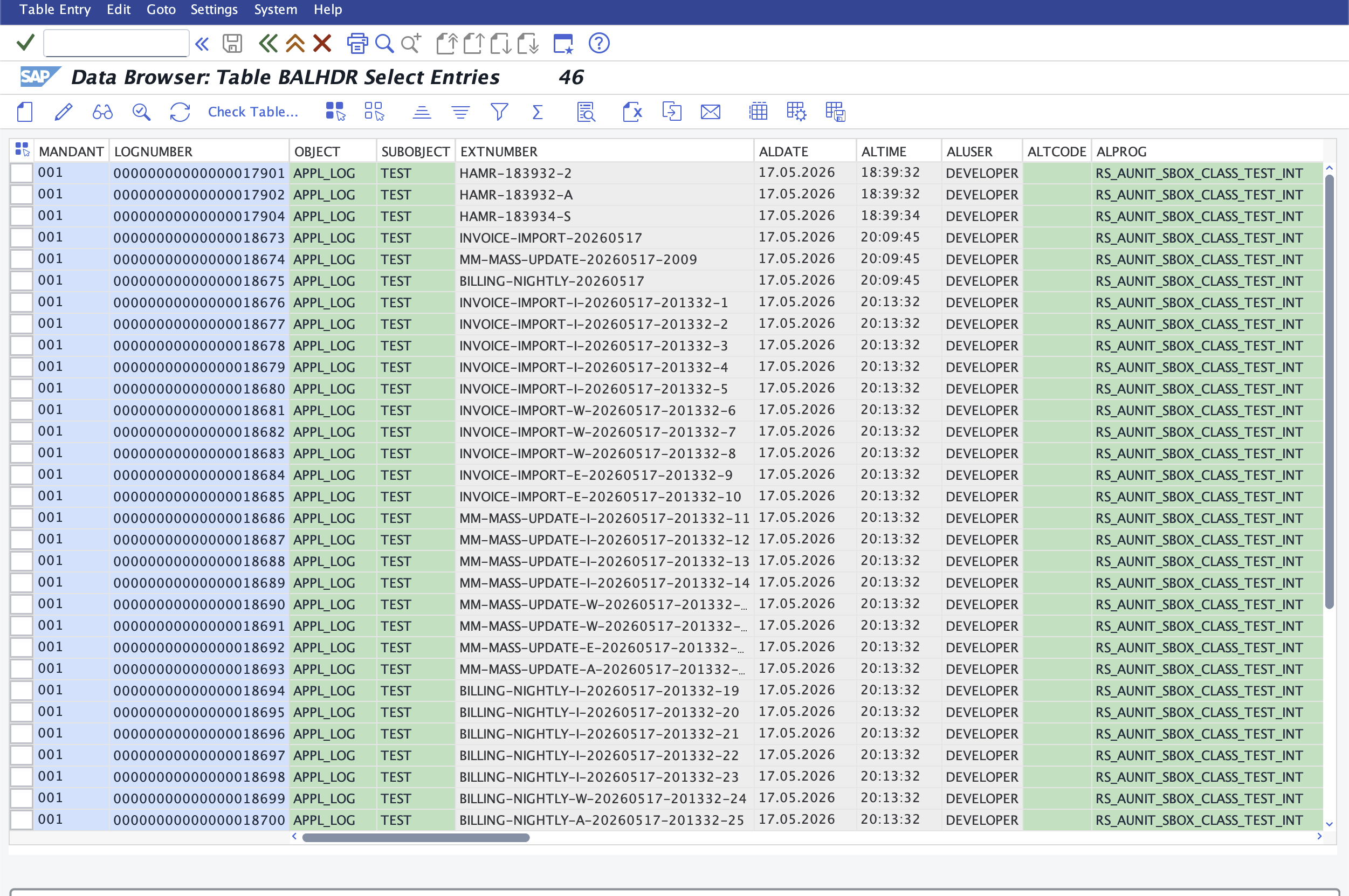
A persisted BALI log ends up in the same database tables (BALHDR, BALM, etc.) the classic BAL infrastructure has always used, because the BALI methods call the same BAL_DB_* and BAL_LOG_* function modules under the hood. Every viewer that knew how to read those tables therefore still works. LOGNUMBER is the sequential identifier visible in SE16; the CHAR22 handle returned by log->get_handle( ) corresponds to BALHDR-LOG_HANDLE, the column LOAD_LOG_WITH_ITEMS( handle = ... ) looks up internally. A direct SE16 against BALHDR returns BALI-saved logs and classic BAL logs side by side:
SLG1 on SAP GUI
On classic AS ABAP and on S/4HANA on-premise, the SAP GUI transactions are still the immediate option. SLG1 opens "Display logs" with a selection screen on object, subobject, external ID, user, time, severity, etc. The result is a flat list of log headers with severity icons on the left, message counts in the toolbar at the bottom, and the messages of the selected log in the lower pane:
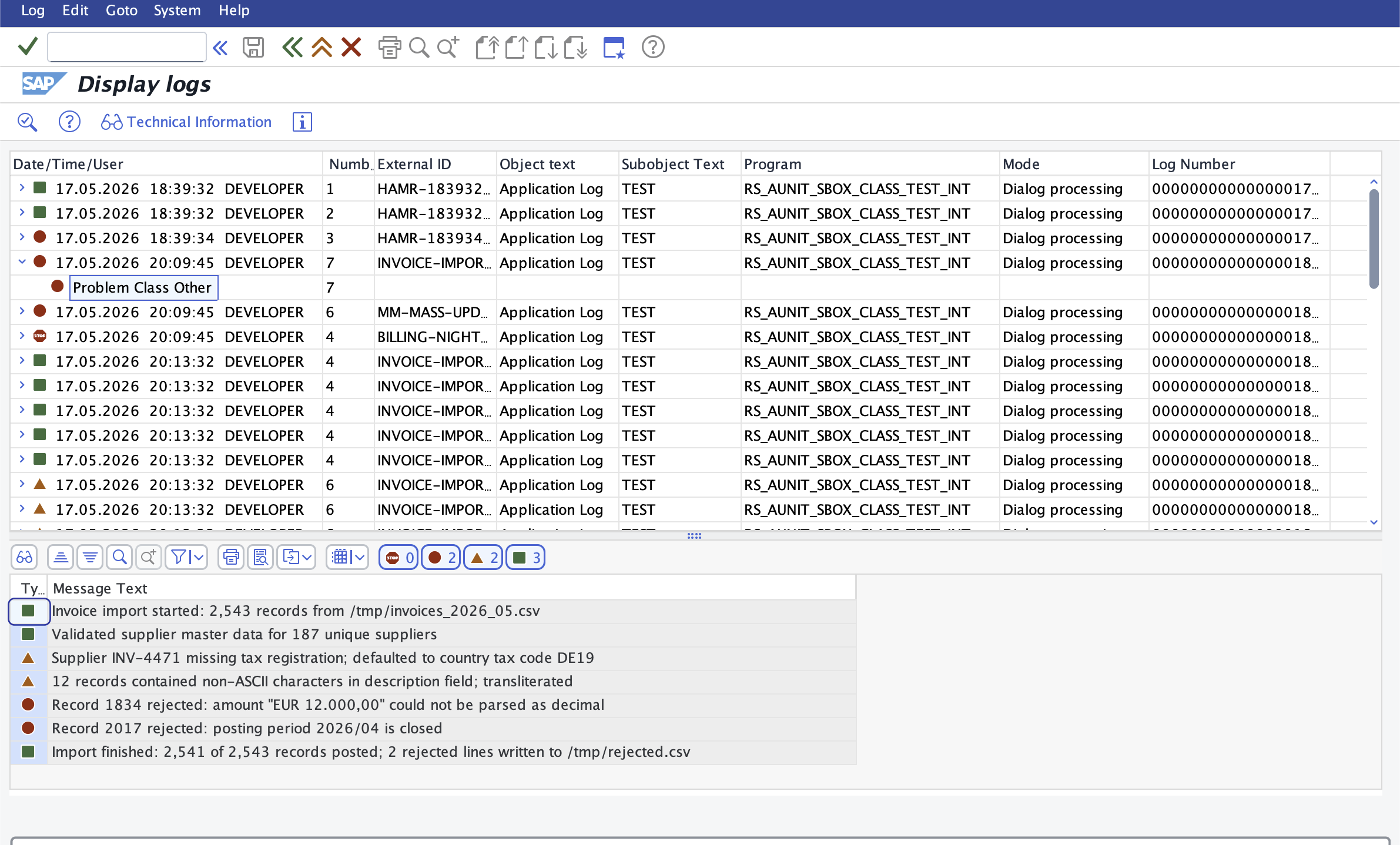
The icons map to the BALI severity constants: green square for status/information, yellow triangle for warning, red circle for error, red stop sign for termination/abort. The lower toolbar shows the totals across the selected log, which is the same data that IF_BALI_HEADER_GETTER->NUMBER_*_ITEMS exposes programmatically.
SLG0 for object maintenance
SLG0 is the maintenance transaction for log objects and subobjects. The Dialog Structure on the left lets you switch between the object list and the sub-objects per object; the right pane lists existing entries and lets you create new ones:
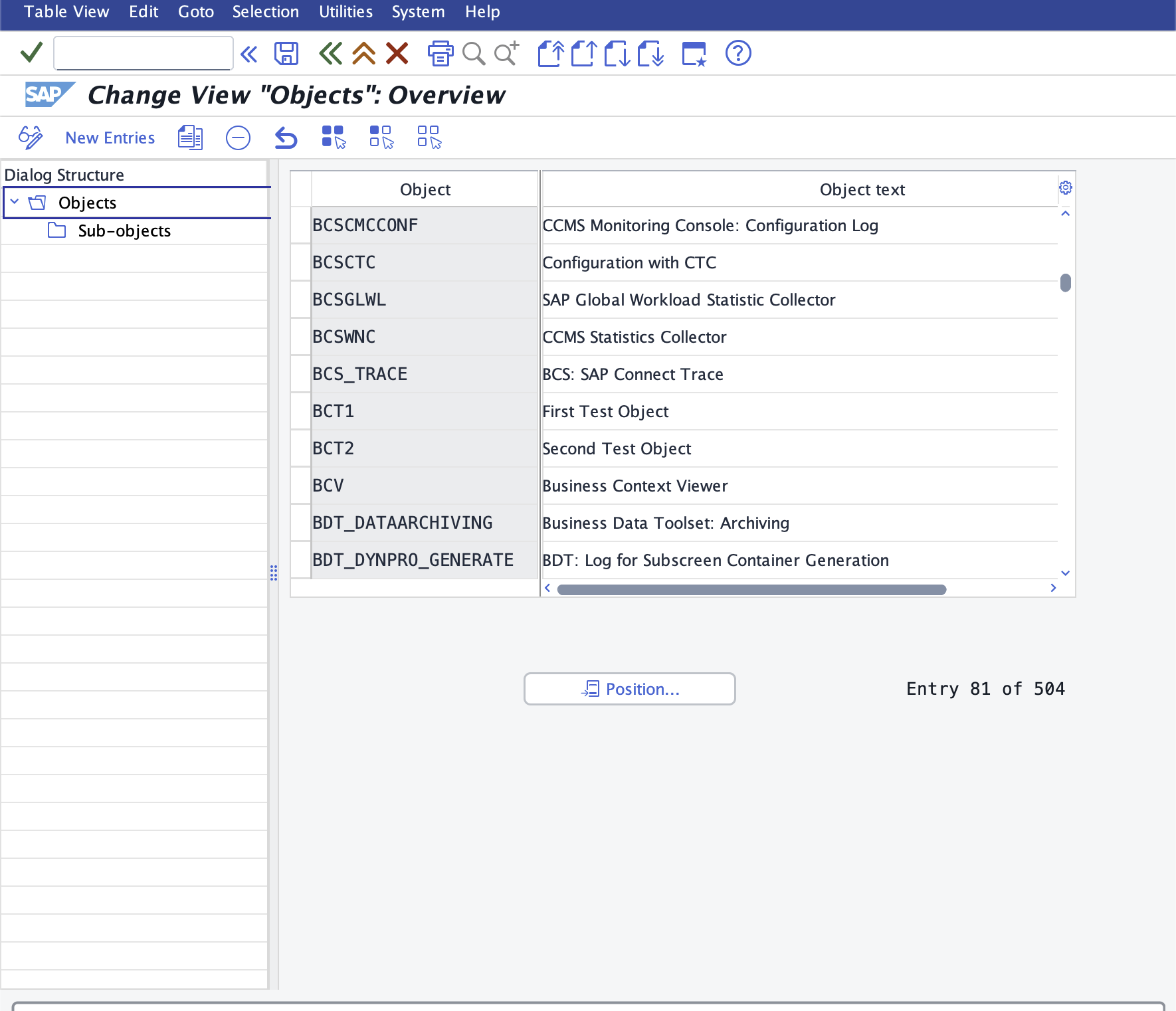
Both SLG1 and SLG0 are deliberately kept around: the function groups behind them are still released, even though their object descriptions in SZAL carry an "(old)" label. The "old" in those labels refers to the procedural API behind the UI, not to the UI itself. For ABAP Cloud work, defining new log objects goes through CL_BALI_OBJECT_HANDLER instead, but the same tables are written.
The Fiori app: Application Logs (F1487)
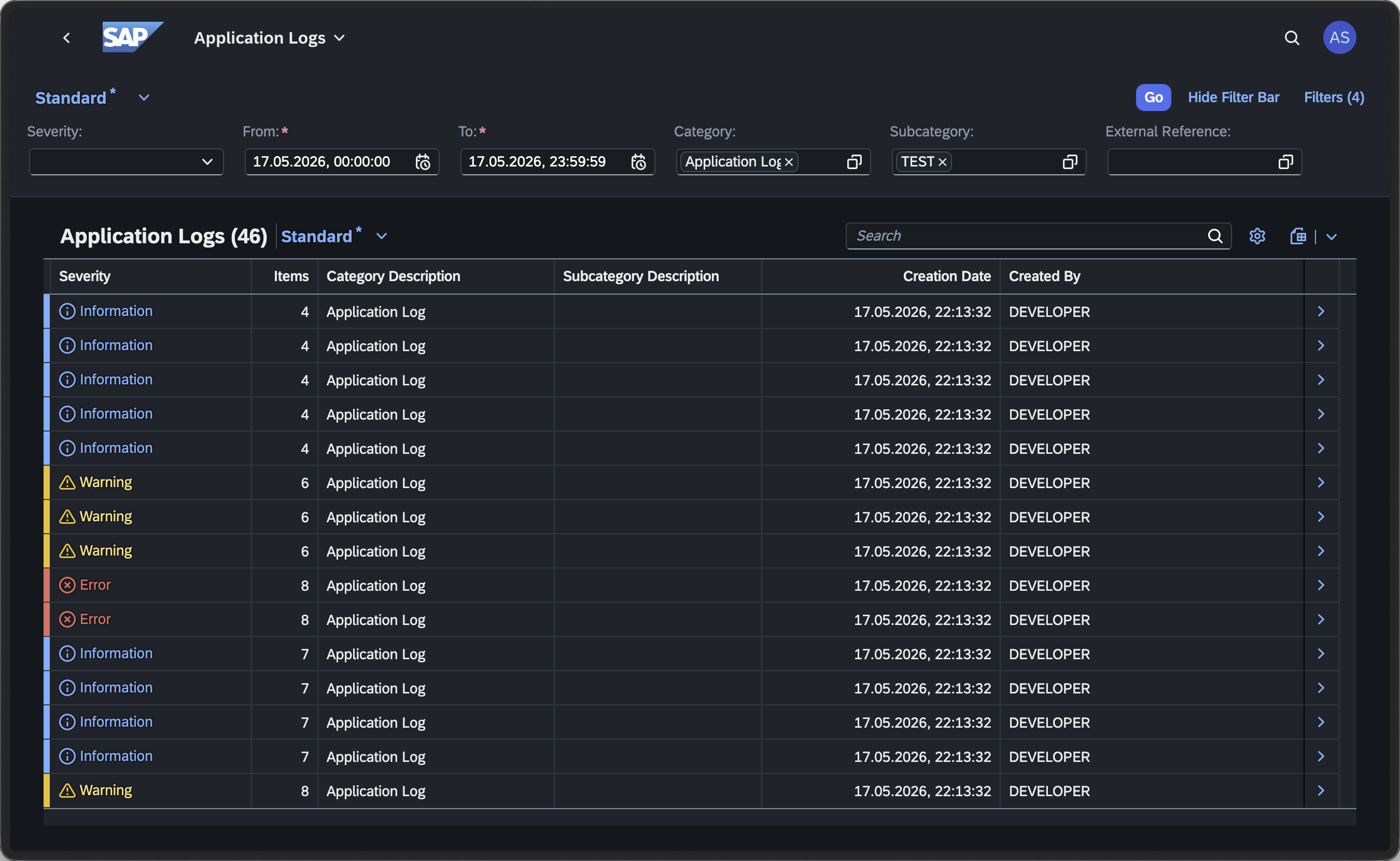
For the Fiori launchpad, SAP ships Application Logs, Fiori ID F1487.6 It is the launchpad-side counterpart to SLG1, but with a deliberate quirk: F1487 is delivered as a generic template app and is not assigned to a standard business catalog. End users see specialised log apps built on top of it for individual business areas (the "Finance Application Log", F5003, is the most cited example). The cross-application view F1487 itself provides is reached either through one of those specialised apps or by launching F1487 directly through its target mapping ApplicationLog-showList.
Launched against the same object/subobject filter, F1487 shows the same set of logs SLG1 does, with a separate Severity column rather than the icon-on-row layout, and an explicit Items count:
Drilling into a log opens the Log Details view, which lists the individual items with the same severity classification, the message description, and a per-item timestamp:
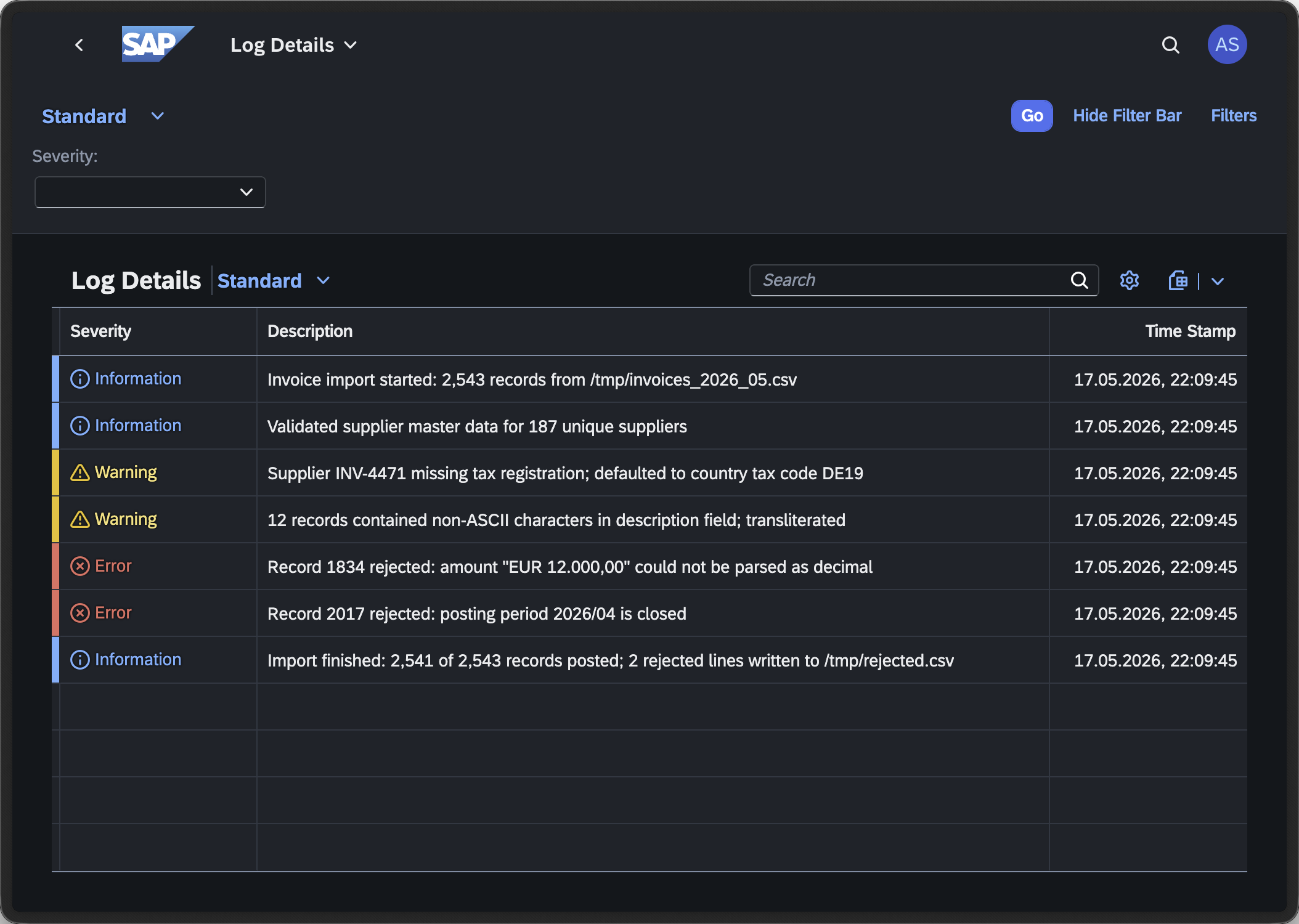
The descriptions visible there are exactly the strings handed to cl_bali_free_text_setter=>create( text = ... ) when the log was written. No transformation in between, no truncation that is not also visible to programmatic readers.
SAP Note 3294175 documents one side effect of this whole catalog model: depending on which catalog and authorizations a user has, the Fiori app can show fewer entries than SLG1 does on the same system.7 If you cannot find your log in F1487 but it is visible in SLG1, that is the reason.
S/4HANA Cloud and the BTP ABAP environment
S/4HANA Cloud Public Edition follows the same model. F1487 itself is not directly assigned to a customer-facing catalog; the specialized log apps are. For custom log objects defined by extensions there are two supported paths besides direct API reads: build a custom UI on top of the Application Logs Reuse Library, which SAP exposes specifically for embedding application-log views into custom apps, or read the logs programmatically through CL_BALI_LOG_DB.8 There is no SAP GUI, and therefore no SLG1, in Public Edition.
On the SAP BTP ABAP environment (ABAP Cloud), the picture is narrower again: no SAP GUI, no SLG1, no Fiori app named "Display Application Logs" in the cockpit. Out of the box, logs are read by code; cl_bali_log_db=>get_instance( )->load_logs_via_filter( ) and its _with_items sibling are the primary path. Two user-facing routes layer on top of that: a log saved with ASSIGN_TO_CURRENT_APPL_JOB from inside an application job becomes visible in the job's transaction log under the Application Jobs Fiori app; custom apps that need a real Fiori list/detail can embed the Application Logs Reuse Library for the messages view rather than re-implementing it.8
In short: SLG1 and SLG0 are still the answer on on-premise, F1487 and its specialized descendants on the Fiori launchpad, and either the Application Logs Reuse Library or direct API reads in S/4HANA Cloud and on the BTP ABAP environment. The persistence layer is the same in every case.
Sources
Footnotes
-
SAP Help, Runtime API for Application Logs ↩
-
SAP Help, Writing Application Logs to the Database ↩
-
SAP Help, CL_BALI_LOG_DB: Interface IF_BALI_LOG_DB ↩
-
SAP Help, Read Application Logs From the Database ↩
-
SAP Help, XCO Business Application Log Module ↩
-
SAP Fiori Apps Reference Library, Application Logs (F1487) ↩
-
SAP Knowledge Base, 3294175 - Application Logs app F1487 is not showing everything that is in SLG1 transaction ↩
-
SAP Knowledge Base, 3549441 - Application Logs (F1487) app is not available when searching for it in Fiori Launchpad ↩ ↩2