Dirty Assign: The ABAP Trick SAP Doesn't Want You to Know

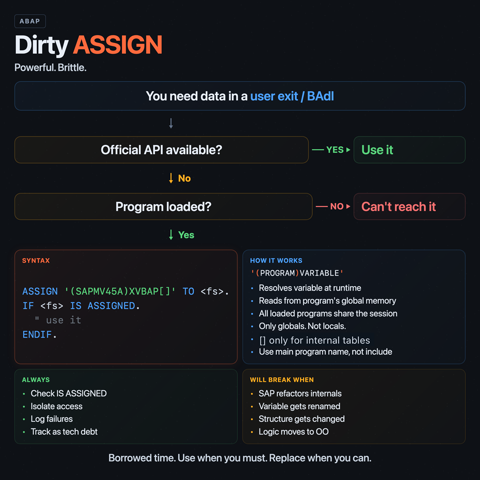
Every ABAP developer eventually hits a wall. You're inside a user exit, you need data that exists somewhere in the call stack, and SAP didn't expose it through the interface. No exporting parameter, no global variable in scope, no function module to read it. The data is right there, in memory, one program away. You just can't reach it.
Unless you use a dirty assign.
The technique
ABAP's ASSIGN statement can do something most developers don't learn in training courses. Given a field symbol and a string containing a fully qualified variable name, it can reach into another program's memory and assign the value directly:
FIELD-SYMBOLS <fs> TYPE any.
ASSIGN ('(SAPLZTESTFG)FB_TESTVAR') TO <fs>.
IF <fs> IS ASSIGNED.
  WRITE: / <fs>.
ENDIF.
The syntax is (PROGRAM_NAME)VARIABLE_NAME. The program must be loaded in memory (it must have been called earlier in the same session). If the variable exists, the field symbol points to it. If it doesn't, <fs> stays unassigned. No dump, no error, just a silent failure.
This works for simple variables, structures, and internal tables. For tables, you append [] to reference the table body:
FIELD-SYMBOLS <xvbap> TYPE ANY TABLE.
ASSIGN ('(SAPMV45A)XVBAP[]') TO <xvbap>.
Now you have read and write access to the sales order item table that SAPMV45A uses internally. You can loop over it, read from it, modify it. SAP didn't give you a parameter for it. You took it anyway.
Where people use this
The most common place is SD user exits. The sales order processing module SAPMV45A is notoriously stingy with the data it passes to user exits. You get some fields, you don't get others, and the ones you need are sitting in global variables of the main program.
Foreign trade data in delivery processing. If you need to modify export control fields (statistical commodity codes, country of origin, export type) from a delivery user exit like USEREXIT_MOVE_FIELD_TO_LIPS, SAP gives you no official way to touch the foreign trade position data. The table XEIPO[] lives inside function group V50E. A dirty assign gets you there:
FIELD-SYMBOLS <xeipo> TYPE ANY TABLE.
ASSIGN ('(SAPLV50E)XEIPO[]') TO <xeipo>.
From there you can loop over the entries, find the position you care about, and set fields like STAWN, HERKL, or EXART. This pattern was widely used in older ECC and ERP systems where the delivery document had no clean API for foreign trade modifications.
Pricing internals. Changing conditions on a sales order through official BAPIs is limited. BAPI_SALESORDER_CHANGE inserts a new condition and deactivates the old one. Surcharges and discounts are even worse. Developers who needed finer control would read the document via SD_SALES_DOCUMENT_READ, manipulate the condition table, and then force a save by flipping internal flags:
FIELD-SYMBOLS <dataloss> TYPE c.
FIELD-SYMBOLS <konv_changed> TYPE c.

ASSIGN ('(SAPMV45A)R185D-DATALOSS') TO <dataloss>.
IF <dataloss> IS ASSIGNED.
  <dataloss> = 'X'.
ENDIF.

ASSIGN ('(SAPMV45A)KONV_GEAENDERT') TO <konv_changed>.
IF <konv_changed> IS ASSIGNED.
  <konv_changed> = 'X'.
ENDIF.
These flags tell SAPMV45A that data has changed and needs saving. Without them, the document save would skip the pricing update. SAP never documented these flags for external use. They're implementation details of the sales order transaction.
Cross-program variable access. You call a function module, it sets an internal variable but doesn't return it. A dirty assign after the call lets you read that variable. Same with external PERFORM calls into other programs. If the program is loaded, its globals are fair game.
Why it works
ABAP programs share a session context. When a program is loaded, its global data area stays in memory for the duration of the session. The ASSIGN statement with a dynamic name simply resolves the variable at runtime. There's no protection mechanism, no access control, no visibility modifier that prevents it. If the program is loaded and the variable exists, you can access it.
This is by design, in the sense that nobody designed it to be used this way. It's a side effect of how the ABAP runtime manages memory. SAP didn't build an access control layer around program globals because the assumption was that you'd use the official interfaces.
Why it breaks
A dirty assign ties your code to SAP's internal implementation. The variable name, the program name, the structure type, the table content. All of it can change with any support package, enhancement pack, or S/4HANA migration.
Concrete ways this goes wrong:
SAP renames or removes the variable. A support pack refactors the internal logic of SAPMV45A. The global variable you relied on is gone or renamed. Your field symbol stays unassigned. If you checked for that, you get silent data loss. If you didn't, you get a dump.
The structure changes. SAP adds or removes fields from an internal structure. If you used typed field symbols, the casting might fail. If you used TYPE ANY, your field access might hit the wrong offset.
The program gets restructured. Function groups get split, programs get renamed, logic moves to classes. The program name in your assign string no longer exists. This is especially relevant during S/4HANA conversions, where SAP has been modernizing large parts of the SD stack.
No upgrade path. SAP will not help you with this. If you open an incident and the root cause is a dirty assign into an internal variable, support will tell you it was never supported. You're on your own.
When it's justified
There is a reason this technique exists in almost every mature SAP system. Sometimes SAP genuinely provides no API for what you need. The user exit is there, the business requirement is real, and the only alternative is a modification to SAP standard code, which is worse.
A dirty assign is justified when:
- You're in a user exit or BAdI where SAP controls the interface
- The data you need exists in the calling program but isn't passed to you
- No function module, BAPI, or BAdI parameter provides the data
- You've checked SAP notes for an official solution and found none
- The alternative is a modification (which creates a harder upgrade problem)
It's not justified when you're just being lazy. If a function module exists to read the data, use it. If a BAdI parameter was added in a later release, upgrade your code.
How to limit the damage
If you're going to do this, do it defensively.
Always check IS ASSIGNED after the assign. Never assume the variable exists.
ASSIGN ('(SAPMV45A)XVBAP[]') TO <xvbap>.
IF <xvbap> IS ASSIGNED.
  " proceed
ELSE.
  " log a warning, fall back, or stop
ENDIF.
Wrap dirty assigns in their own methods or form routines. Isolate the access so it's easy to find, easy to replace, and easy to test after upgrades.
Document what you're doing and why. A comment explaining which SAP note you checked and why no official API exists will save the next developer hours of guessing.
Log when the assign fails. If a support pack breaks your access, you want to find out from a log entry, not from a production incident three weeks later.
Keep a list. Every dirty assign in your system is technical debt with an unknown due date. Track them, review them during upgrade projects, and replace them whenever SAP provides an official alternative.
The shelf life problem
Dirty assigns are borrowed time. They work until they don't, and you won't get a deprecation notice. Every SAP upgrade is a potential breaking change for every dirty assign in your codebase.
In ECC, this was manageable. SAP's internal structures were relatively stable between enhancement packs. In S/4HANA, the risk is higher. SAP is actively refactoring modules, moving to new data models (ACDOCA, MATDOC), restructuring function groups, and introducing new APIs. A dirty assign that survived ten years in ECC might break on the first S/4HANA update.
The technique is real, the use cases are legitimate, and the risks are not theoretical. Use it when you have to. Replace it when you can. And never pretend it's a real API.